PDF markup for low-voltage techs.
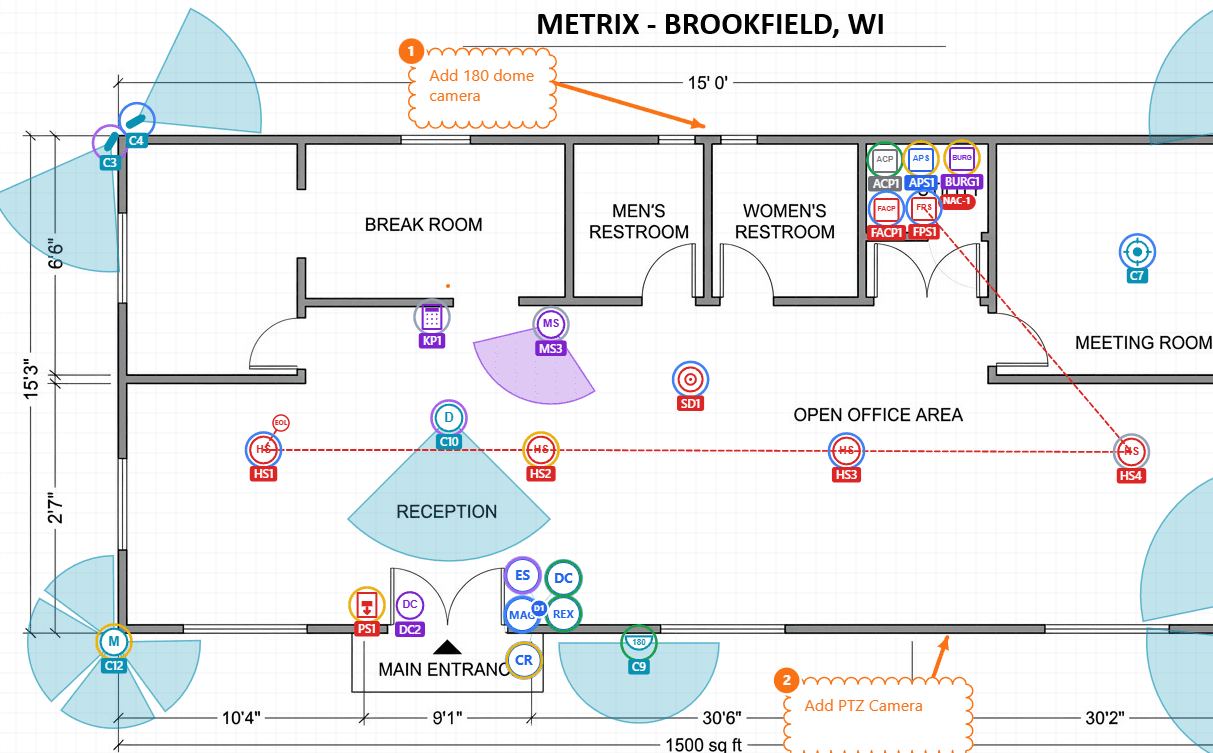
Place CCTV, access control, intrusion, and fire devices on your customer's floor plan. Define custom hardware for anything we don't ship. Track install status. Export the customer facing device schedule.
Free during early access. Founding members lock in $19/mo for life before public pricing starts.
What's in it
Built around the workflows you do on site surveys, walks, and bids.
Trade-specific icon library
CCTV, access control, intrusion, fire alarm, network/data, electrical, audio/video, automation, and healthcare. Drawn as plan symbols, not generic stamps. Ships with the panels and power supplies you actually spec (ACP, APS, FACP, FPS) plus 12 network icons, 16 NECA-style electrical outlets and switches, 15 audio/video icons (displays, projectors, speakers, mics, racks, amps, DSP), and 10 automation icons (lighting keypads, dimmer modules, processors, motorized shades, thermostats).
FOV cones on cameras
Every camera has an adjustable field-of-view cone. Drag to point, slider to widen. No separate coverage tool to keep open.
Calibration and wire run measurement
Drop a known distance on your floor plan and the editor learns the scale. The wire run tool then taps out cable routes with live per-segment and running totals in real feet or meters. Every run rolls up into a cable schedule on the BOM PDF and CSV. Drag any waypoint to nudge the route or add a midpoint on the fly.
Team management
Build your account roster, assign people to projects from a picker, and track skills and certifications. Five built-in positions with the right permissions for each. Sub-contractors and customer contacts get the lightweight invite flow as project guests so external folks never clutter your roster.
Customer book that scales
One customer carries multiple sites and multiple contacts, so a second job at the same address is a few clicks instead of retyping everything. Address autocomplete fills city, state, and ZIP automatically on every customer, site, and company profile form.
Custom hardware
Define your own letter codes for anything we don't ship. Fiber switch, UPS, PoE injector, panel relay. They render as labeled circles in your project category and feed the device schedule.
Door groups
Bundle reader, strike, mag, contact, and REX into one door. Add hardware later when the scope changes. Door identity rides as a single pin on the floor plan.
Install status tracking
Planned, wired, installed, tested, approved. Update each device as the job moves through phases. Status colors travel with the device on the canvas and the export.
Photos per device
Snap from the field, attach to the device. Generate a branded site photo report grouped by floor plan, captioned with the device and its status, so the customer sees the install evidence.
Bill of materials + customer PDFs
Every device rolls up into a BOM with manufacturer, model, qty, labor hours, margin, tax, and permit fees. Two PDFs from one quote: internal shows your full cost breakdown, customer-facing bakes margin into the prices and prints with your logo, license, and contact info. CSV for accounting.
Auto-numbering that just works
Drop a camera, get C1. Drop another, get C2. Delete C2 and your next placement becomes C2 again. Same for text callouts on the plan. Other tools make you renumber by hand. This one doesn't.
Device schedule export
PDF appendix or CSV. One row per device with type, label, location, model, mount, and install status. Grouped by system so all cameras land together, then access control, then fire. Drop the CSV straight into the bid spreadsheet.
Quick Count tool
Six color buckets, page-scoped tally, expected-count reconciliation. Walk a plan and click each device as you count it. Never exports. Just for you to validate before you commit a device to the BOM.
Rapid-fire placement
Hold Z and place 30 cameras in 30 seconds, or tap the sticky toggle in the toolbar and the tool stays selected after every drop. Built for techs who count fast.
Status markers for retrofit jobs
Working on a customer's flattened PDF that already has devices on it? Drop a hollow status ring around an existing device and track Planned through Approved without redrawing what's already there.
Blank-canvas drawing
No floor plan? Start with a blank canvas. Draw walls with snap-to-corner, then cut openings: doors, double doors, windows, and overhead/garage doors. Drop devices on the sketch and the BOM still works.
Device matrix per project
The spreadsheet view of every device in your project. Filter by system or plan, edit name, location, model, IP, switch, and port inline. Status pill on every row. CSV export when the estimator wants the data in Excel. Every team member can access it, not just the owner.
Sales pipeline built in
Every project has a status: Draft, Proposal, Won, In Progress, Invoiced, Lost. The dashboard rolls up open proposals, pending installs, and invoiced this month. Win a sales proposal and one click converts it to a New Install project with statuses re-mapped.
Mobile field viewer
A streamlined phone view for techs on a job. Tap any device to update status, snap photos pinned to that device, edit notes. No drawing tools, no clutter. Built for the tech who's already on a ladder.
Customer share links
Generate a public read-only link to show a marked-up plan to a customer. They click it, they see the plan and your markup. No account, no install. Revocable in one click. Share links never expose install photos or BOM costs.
Free tools for the field
The arithmetic you do on the tailgate, done properly. No account, no email, nothing to install — they run in the browser, so they work on a phone with one bar.
Camera Field of View and PPF Calculator
Lens, sensor and resolution in; angle of view, scene width, pixels per foot, DORI range and the blind spot under the mount out.
Open itCCTV Video Storage Calculator
Mixed camera groups in; terabytes, how many drives, and the bandwidth the switch has to carry out.
Open itMore on the way
PoE budget, DC voltage drop, NAC loop, and a printable lens and DORI chart for the truck.
Tell us which one you needWhy not just mark up the PDF you already have?
Generic markup tools and paper get lines on the page. FieldMarkup understands what you're installing.
Trade-aware device icons (CCTV, access, intrusion, fire, network, electrical, audio/video, automation, healthcare)
Camera field-of-view cones
Auto device schedule + BOM export
Import a vendor quote or CSV into the BOM
Parts library + price book with price history
Install status tracking (planned → tested)
Photos attached per device
Field status updates from a phone
Read-only customer share link
Built for low-voltage, not architecture
Bluebeam Revu is a great horizontal markup tool; it just isn't built for low-voltage. FieldMarkup is.
Icons for what you install. Custom letter codes for the rest.
Ships with cameras, readers, sensors, panels, and power supplies. Anything we don't have, define your own letter code and it renders as a labeled circle in the right system category.
Cameras
- Dome
- Bullet
- PTZ
- Multisensor
- Dual-lens camera
- 180° camera
- Camera
- Dome camera
- Bullet camera
- PTZ camera
- 360 / Fisheye camera
- NVR
- Workstation
- Encoder
- Height strip camera
- FDIC camera
- FDIC
Access control
- Card reader
- REX (motion)
- Door contact
- Magnetic lock
- Push-to-exit button
- Automatic opener
- Electric strike
- Access control panel
- Access power supply
- Lever set
- Mortise lock
- Electrified lever set
- Exit device / crash bar
- Special lock
Intrusion
- Motion sensor
- 360 motion sensor
- Panic button
- Glass break sensor
- Keypad
- Burg panel
- Door contact
- Interior siren
- Exterior bell
- Window contact
- Photoelectric beam
- Shock / vibration sensor
- Seismic detector
- Tilt sensor
- Duress / holdup button
- Bill trap
- Teller cash recycler
- Zone expander
- Cellular communicator
- Wireless receiver
- Water / flood sensor
- Overhead door contact
- Dual-tech motion sensor
- Curtain motion sensor
- Temperature sensor
Fire / Notification
- Smoke detector
- Horn-strobe
- Strobe
- Pull station
- Heat detector
- Fire alarm control panel
- Fire power supply
- Duct smoke detector
- Waterflow switch
- Valve tamper switch
- Speaker
- Speaker-strobe
- CO detector
- Magnetic door holder
- Remote annunciator
- Monitor module
- Control / relay module
Network / Data
- Single data jack (RJ-45)
- Dual data jack (2-port)
- Quad data jack (4-port)
- Fiber jack
- Patch panel (1U)
- Network switch
- Wireless AP (ceiling)
- IDF / MDF rack
- J-hook (cable support)
- Router
- Rack tray / shelf
- VoIP phone
- PoE injector
- Cable tray
- Network printer
- Data jack (circle)
- Wireless AP (circle)
Audio / Video
- Display / TV
- Projector
- Projection screen
- VC camera
- Touch / control panel
- Ceiling speaker
- In-wall / surface speaker
- Subwoofer
- Ceiling mic
- Volume control
- AV equipment rack
- Amplifier
- AV receiver (surround)
- DSP / processor
- AV wall plate / input
- A/V matrix switch
Automation
- Lighting keypad
- Keypad dimmer
- Lighting control module
- Automation processor
- Motorized shade
- Shade motor / controller
- Thermostat
- Occupancy / daylight sensor
- Wireless gateway / hub
- Video intercom / door station
Electrical
- Duplex receptacle
- Quad receptacle
- GFCI receptacle
- Half-switched receptacle
- USB receptacle
- Floor receptacle
- 240V receptacle
- Single-pole switch
- 3-way switch
- 4-way switch
- Dimmer switch
- Occupancy / vacancy sensor switch
- Service panel
- Sub panel
- Junction box
- Recessed can light
Healthcare
- Patient station
- Call button
- Pull-cord station
- Pillow speaker
- Staff-assist station
- Code blue station
- Bed connector
- Area-of-refuge station
- Duty / master station
- Annunciator
- Corridor dome light
Misc
- Network drop / RJ45
- Status marker
Priced like a tool, not a platform.
Free while we're in early access. Sign up now and Pro is $19/mo for life instead of $30, for as long as you stay subscribed.
Free
Try it on a real survey before you commit.
- Unlimited floor plans during early access (3 once public pricing starts)
- Full icon library access (CCTV, access, fire, intrusion, network, electrical, audio/video, automation, healthcare)
- Calibration and wire run measurement with cable schedule
- Clean PDF exports
- 1GB storage
- Single user
Pro
For solo integrators and small shops.
- Unlimited floor plans
- Full icon library + custom hardware
- Calibration, wire run measurement, cable schedule on BOM and CSV
- BOM import: build a bill of materials from a vendor quote PDF or CSV
- Parts library and price book with price history
- Address autocomplete on customer, site, and profile forms
- Your company logo on exports
- Device schedule CSV + PDF export
- Photo attachments per device
- Mobile field status updates
- Customer book (Customer to Site to Contact) plus project guests for sub-contractors and customer contacts
- 10GB storage
Team
For crews bidding + running multi-site work.
Live now, free during early access · per-seat pricing at public launch
- Everything in Pro
- Multi-seat company roster with five built-in positions (Owner, Manager, PM, Technician, Contractor)
- Assign team members to projects from a picker; no email round-trip
- Skills matrix (CCTV / access / intrusion / fire / network / electrical / audio / healthcare by install vs program)
- Certifications tracking (NICET, BICSI, license numbers) with expiration status pills
- Per-project activity feed showing who edited what
- Shared custom hardware library
- Priority support
Free during early access, and nothing to pay while we're in beta. Sign up before the founding window closes and Pro stays $19/mo for life instead of $30, for as long as you stay subscribed. We don't meter per-markup. Storage caps are the only variable; that's the only thing that actually costs us something.